Inside the SEO Workbook: Raptive’s workflow for smarter search growth

Search is evolving faster than ever, and prioritizing what to update next has become more complex.
Manual analysis slows progress. Reports from multiple tools get exported. Spreadsheets multiply. By the time updates begin, search has already shifted. In today’s landscape, a clear, repeatable workflow makes all the difference.
That’s why we built the SEO Workbook.
SEO is a core focus at Raptive, led by a dedicated team that partners with creators to drive sustainable growth. The SEO Workbook brings that same expertise into your dashboard, turning your site’s performance data into personalized, ranked recommendations so you know exactly what to work on next.
Most SEO tools show you data. The SEO Workbook gives you clear next steps.
Meet the SEO Workbook
Most creators and publishers know they should update older content and publish consistently. The challenge is knowing where to focus.
Across our network, we see meaningful pageview growth when creators prioritize high-impact updates and maintain a steady publishing cadence.
The SEO Workbook translates those insights into a practical system you can use every week.
With performance insights in a single connected workflow, you can understand what’s happening, decide what to prioritize, and measure the impact of your work over time.
What the SEO Workbook helps you do
The SEO Workbook gives you a clear, repeatable way to manage SEO.
It helps you:
- See how your Google organic traffic is performing
- Understand how publishing and updates impact performance
- Identify which pages deserve attention and how much effort they require
- Evaluate how new content is performing over time
- Explore your full library to find more opportunities
What you’ll find inside the SEO Workbook
The SEO Workbook has four core tabs, each one supporting a different part of your workflow.
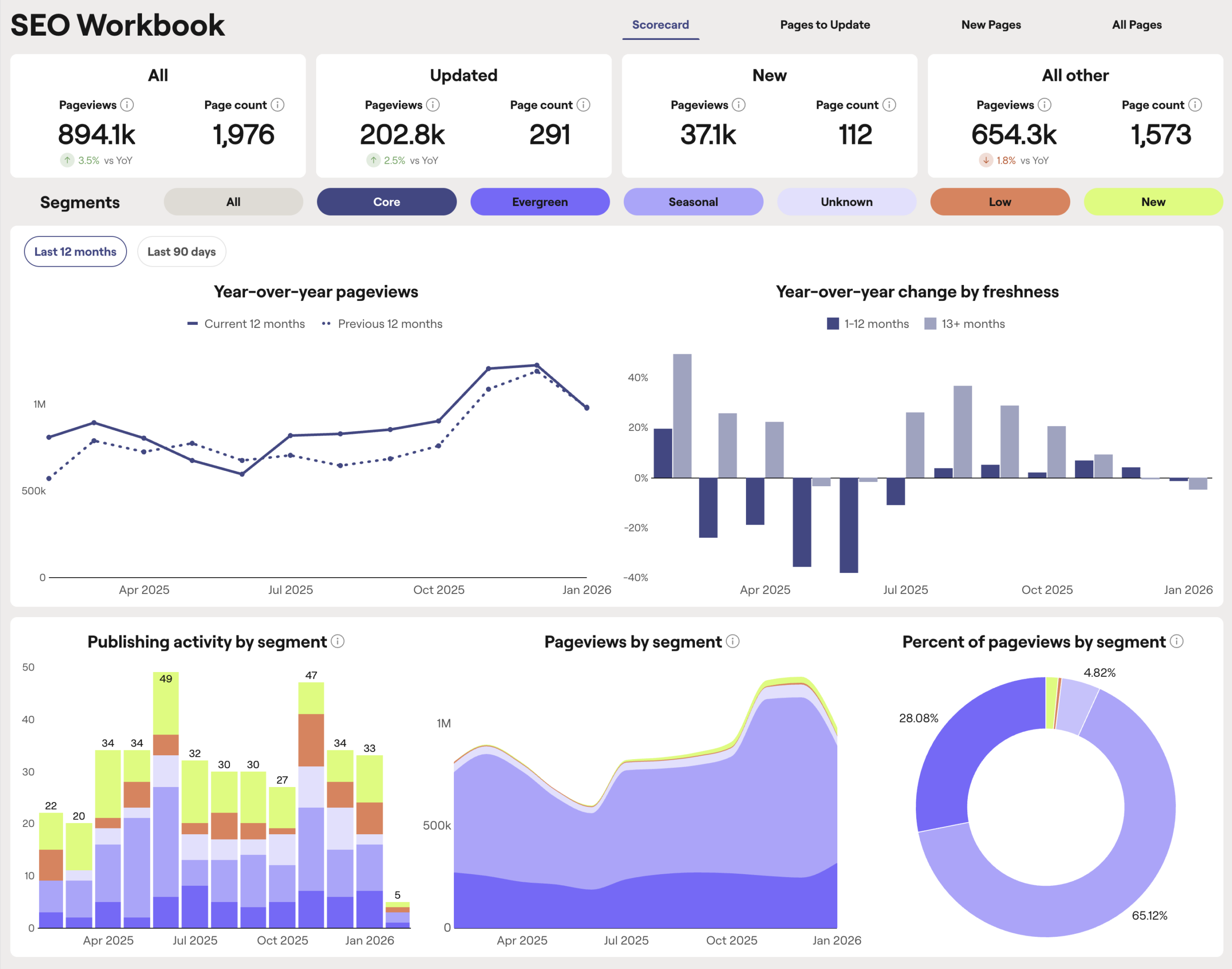
SEO Scorecard
The SEO Scorecard is your starting point for understanding overall search performance. It shows Google organic traffic together with publishing and update activity, helping you quickly see what’s working, what’s slipping, and where to focus next.
Pages to Update
Pages to Update is where most creators begin when planning content refreshes. It surfaces a ranked list of existing pages with the greatest potential to regain or grow search traffic.
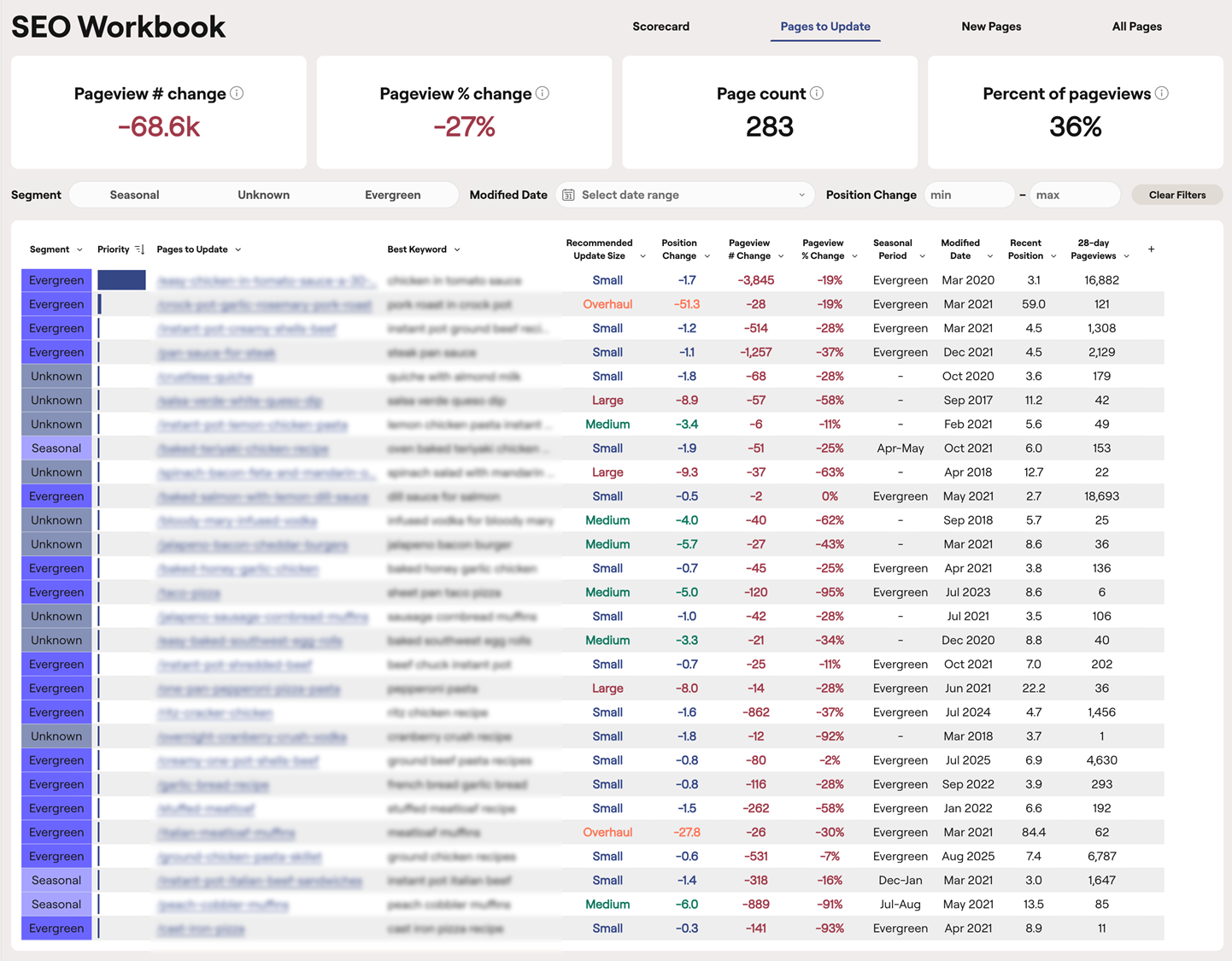
Pages are evaluated using performance signals such as traffic declines, ranking shifts, seasonality patterns, and the page’s last update date, so you can quickly identify the pages most worth your time.
To keep recommendations current, pages updated in the last four months are excluded, and priorities are refreshed weekly.
New Pages
The New Pages tab tracks how recently published content performs during its first 12 months in search. It helps you understand how long posts typically take to gain traction and whether your publishing efforts are improving over time.
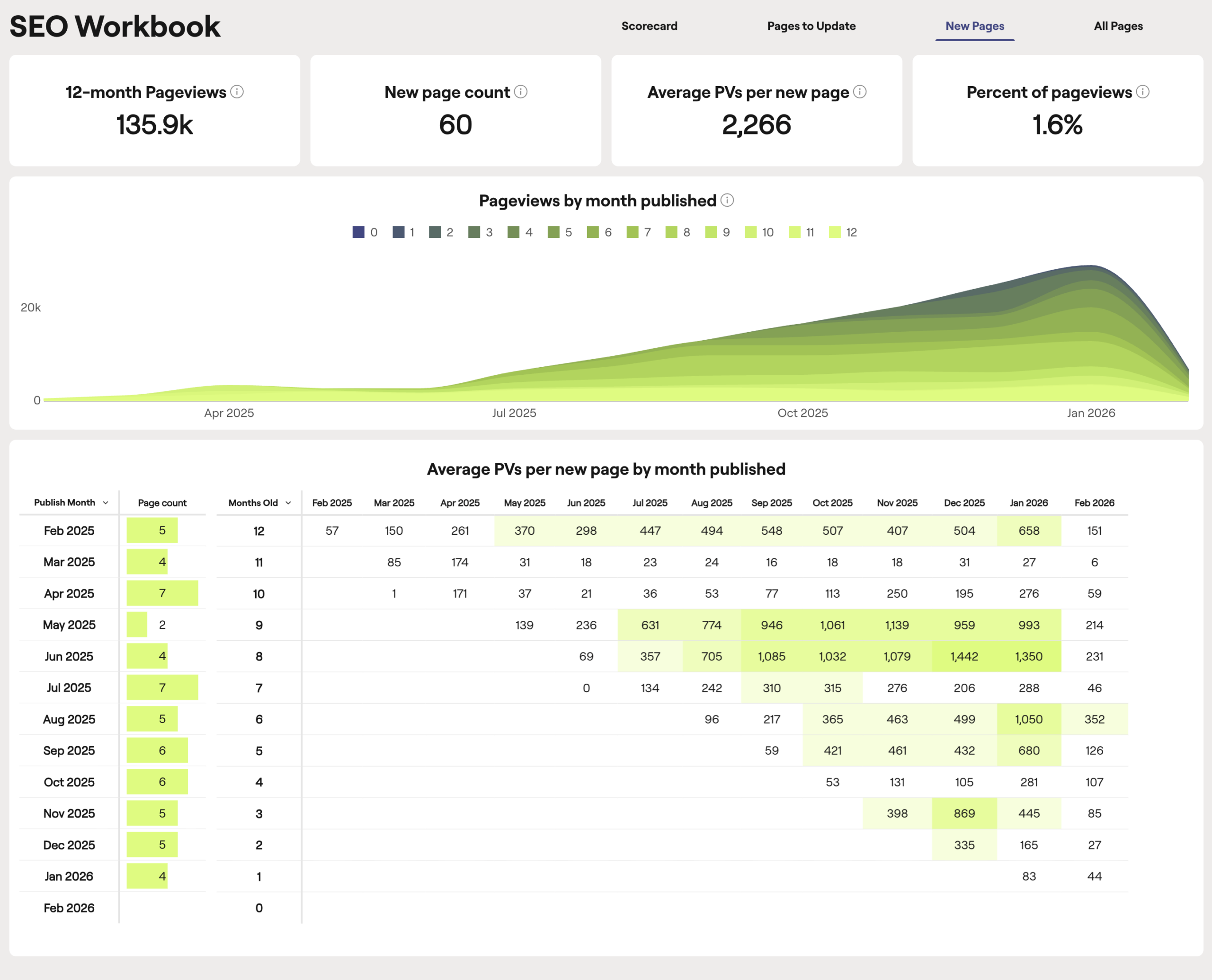
This view shows only new content, so the data isn’t influenced by older posts. That clarity helps you set realistic expectations and avoid reacting too soon.
All Pages
The All Pages tab gives you a complete view of your site’s search performance. It’s where you go when you want to look beyond prioritized updates and identify trends across your content library.
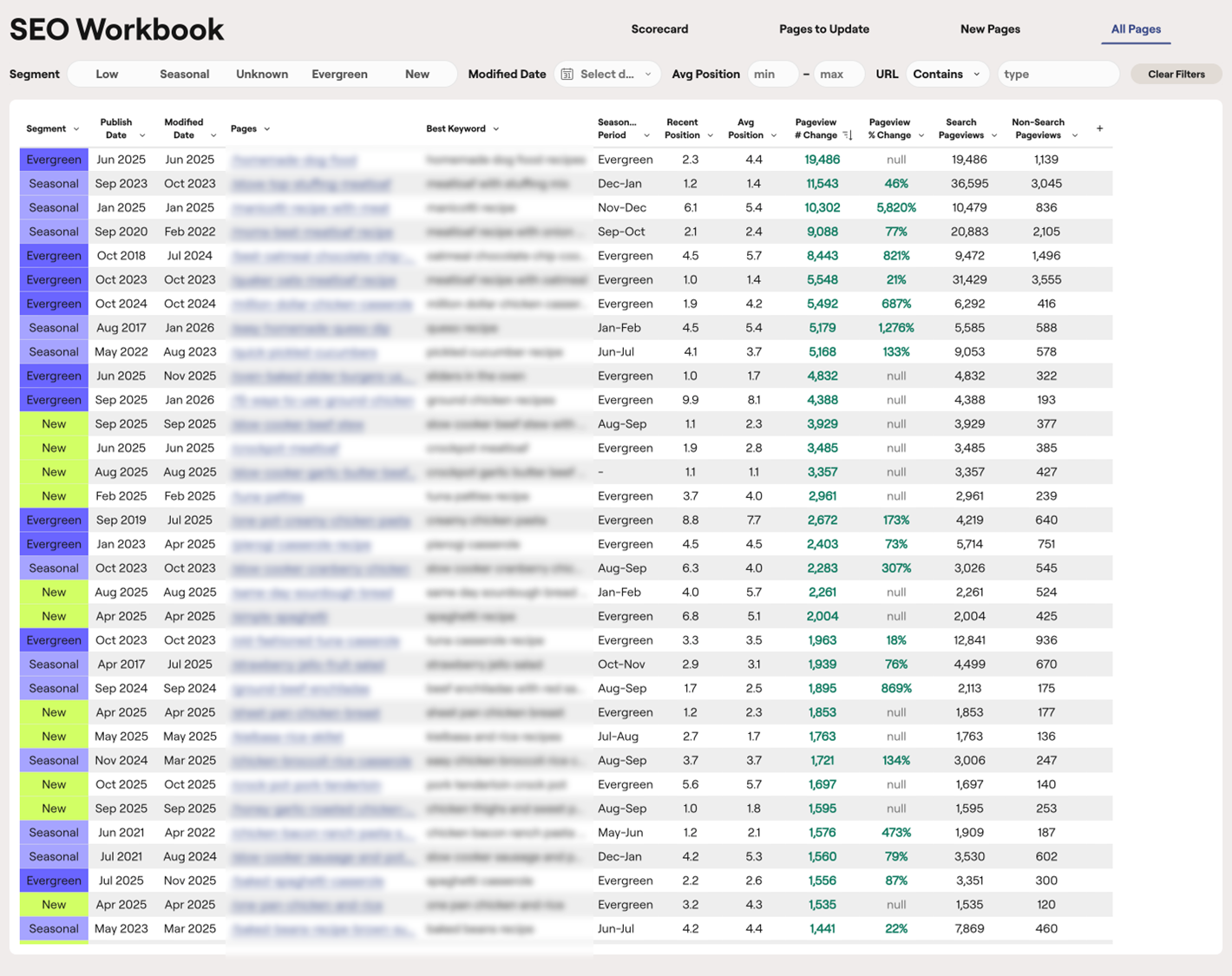
You can review rankings, search pageviews, and traffic changes to spot patterns, identify early gains or declines, and uncover opportunities that may not surface in Pages to Update. Recent non-search pageviews are also included, giving you a broader view of overall page performance.
What early data shows about prioritized updates
The SEO Workbook is newly available to many creators, but we’ve already collected and analyzed meaningful usage data from early adopters, combined with performance trends across thousands of sites in the Raptive network.
Across the network, Raptive creators complete more than 170,000 content updates each month. Creators who update content more frequently see 60-100% more pageviews than those who update significantly less.
Prioritization matters as much as consistency. In the Workbook, top-ranked recommendations represent 4x more recoverable pageviews than lower-priority pages.
From early SEO Workbook users, we’re also seeing measurable behavioral shifts:
- Workbook users update content at an 11% higher cadence than non-users.
After 60 days of use, creators complete 47% more recommended updates compared to their first 30 days.
Want to use the SEO Workbook?
The SEO Workbook is built for Raptive creators and publishers who want stronger search performance without turning SEO into a full-time job.
It’s especially valuable if you:
- Manage a large content library with untapped traffic potential
- Feel unsure which posts to update first
- Publish consistently, but are not seeing a meaningful lift in search traffic
- Want a clearer, more structured way to focus your effort without hiring an SEO team
Data requirements
The SEO Workbook requires sufficient historical data to generate accurate, reliable recommendations.
You must have:
- A WordPress site with at least 9 months of Google Search Console data within a domain property
- At least 52 weeks of Google Analytics data
- Google Search Console connected to your Raptive dashboard
Once your domain property is connected, it may take a few days for your Google Search Console and Google Analytics data to appear in Content Optimization. The SEO Workbook becomes available once your domain property has 9 months of Google Search Console data and the other required data is available.
Other personalized Content Optimization recommendations may become available sooner. Posts and Briefs may begin providing personalized recommendations once your domain property has about two months of Google Search Console data.
This helps ensure recommendations are based on meaningful comparisons rather than partial or short-term data.
A smarter way to grow through search
The way people search keeps evolving. Steady, focused work still wins. Creators who consistently update the right pages are the ones who see long-term growth.
The SEO Workbook makes that work simpler. It shows you what to prioritize and keeps everything in one place, so you can spend less time deciding what to do next and more time improving the pages that drive traffic.
If you’re ready for a smarter way to prioritize and grow through search, learn more about joining Raptive and see how the Workbook can help you get more from the content you’ve already created.
 `
`
 `
`
 `
`